Not every order needs a call.
The assistant checks an order before it calls. Marketplace orders, subscriptions and small amounts are skipped, so credits go to what really needs confirming. Fewer pointless calls, lower cost, more confirmed parcels.
* Result from the HealthLabs Pharm pilot (01–03/2026) and a comparison with other stores in the industry. Your result depends on where your orders come from, the amount threshold you set and the rules you turn on in the panel.

Three filters that save credits.
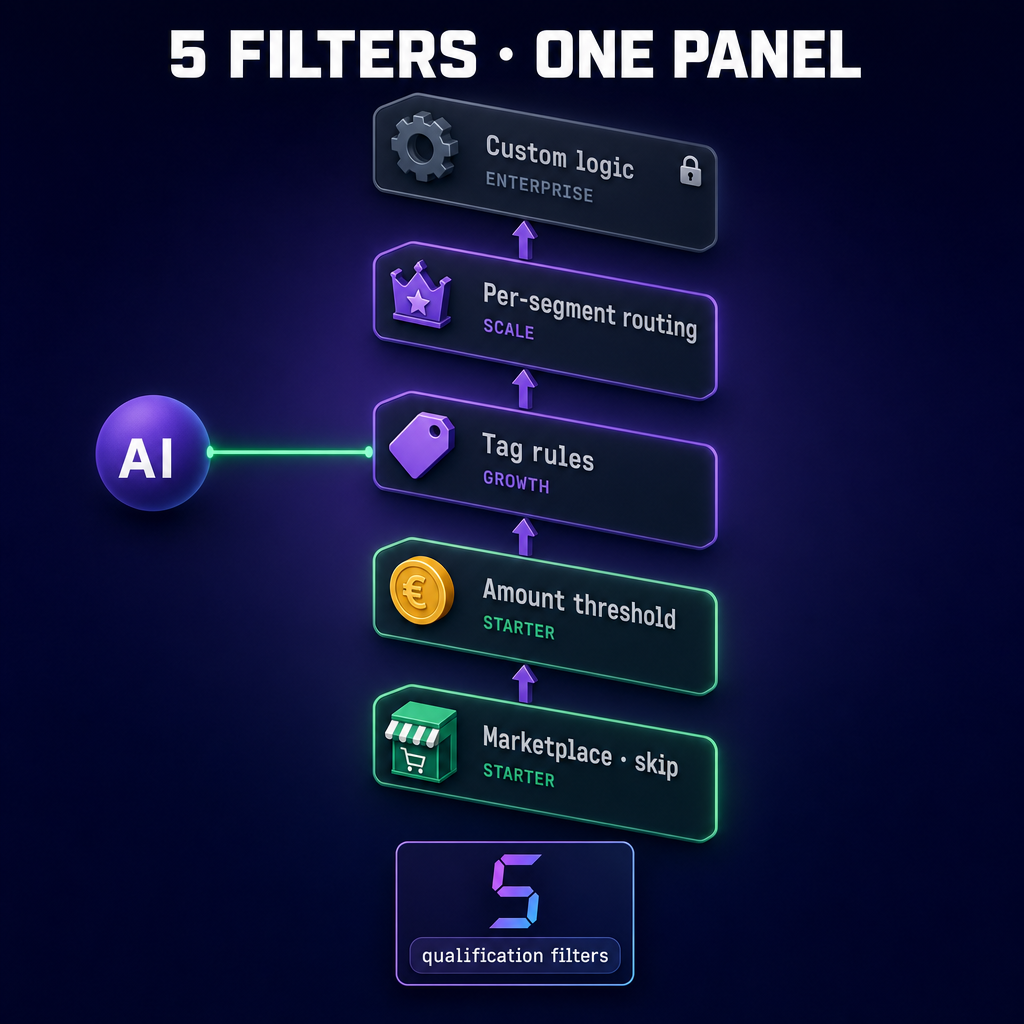
The assistant screens out orders that are not worth a call: marketplace orders, small amounts and repeats. Credits go to cash-on-delivery and paid-upfront orders that really need confirming. Starter gives you 3 filters, Growth adds rules on order tags.
Amazon, eBay, Etsy — skipped
Marketplace orders have their own return flow and their own customer contact. You block calls for the sources you choose — the assistant does not call, you do not lose credits.
Amount threshold and repeat orders
Orders below the threshold (default $12) are skipped — the call would eat the margin. Repeats within 60 minutes are skipped too, so we never call the same customer twice.
Rules on tags — subscriptions, promos, VIP
In Growth you add your own rules on order tags: "tag:subscription → skip" (subscriptions renew on their own), "tag:vip → priority". You click it in the panel, no developer needed.
Order → filters → action.
The decision takes a blink. The order arrives from your store, the assistant checks the rules and decides: call, skip, or send for manual review. You only see the result in the panel.
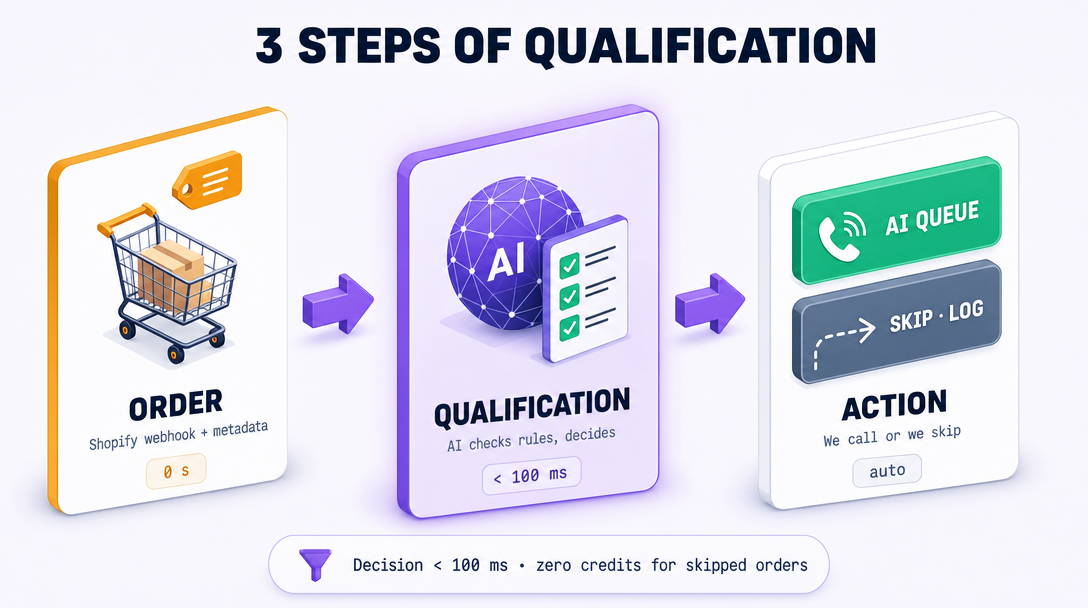
The order arrives with its data
Your store passes the new order to us. We read the amount, the tags, the source, the payment type (paid upfront or cash on delivery) and whether the customer has bought from you before.
Rules and decision
The assistant runs the order through every rule you have turned on (marketplace, amount, tags, segment). Decision: call, skip or send for manual review.
Queue, or skipped with a reason
"Call" — the order goes into the call queue. "Skip" — we save the reason (marketplace, amount, tag). You see all of it in the panel and can filter it.
Your rules, the assistant checks.
Under Settings → Order filters you turn on the main switch, add rules and see which orders the filters stop and which go to the call queue. You click all of it yourself — no developer, no extra tools.
- ✓Main switch — turn filters on or off for the whole store
- ✓Marketplace order block — Amazon, eBay and Etsy separately
- ✓Amount threshold — "below X → skip" (default $12)
- ✓Rules on order tags — "tag:subscription → skip", "tag:vip → priority"
- ✓Skip log — every skip is in the panel with its reason
Queues by segment — VIP faster, new customer more carefully.
With more orders the filter is not only "call or skip", but also "into which queue". A customer tagged VIP goes to priority, a new customer with a large order goes to manual review.
Separate queues per segment
You build customer segments from order tags and purchase history. Each segment has its own priority in the queue: VIP faster, a new customer with a large amount slower (manual review), a break after a complaint.
Priority queue for VIP
Customers tagged VIP go ahead of the queue · the assistant calls them first · your team gets an alert in the panel.
A break for one customer
Did the customer get a call in the last few hours? We skip their next order · we never call twice in a row · you set the length of the break.
Fewer calls, the same confirmations.
* −40% skipped calls was measured on the HealthLabs Pharm pilot (01–03/2026), after turning on Starter's 3 filters and the tag rules from Growth. Your result depends on how many orders come from marketplaces, the amount threshold and the tags you use.
A store that stopped calling everything.
We used to call every order, even the ones from Amazon. 30% of the calls went nowhere, because marketplaces have their own return flow. After turning on the rules: 40% fewer calls, the same confirmations. Credits go to cash-on-delivery and paid-upfront orders that really need that call.
* Quote from the HealthLabs Pharm pilot (01–03/2026), an e-commerce store. Data anonymized.
Filters in every plan.
The three basic filters (marketplace, amount, repeats) already work in Starter. Growth adds rules on order tags, Scale adds separate queues per segment and priority for VIP.
Growth
Rules on order tags + your own filters per store
5,000 credits / mo · about 100 worthwhile calls + extra credits when you need them
- ✓3 basic filters (marketplace + amount + repeats) — from Starter
- ✓Rules on order tags — "tag:subscription → skip", "tag:pre-order → skip"
- ✓Combine conditions — 'and' or 'or', no developer needed
- ✓Skip log — filtering and the reason for every skip
- ✓Live filter panel: how many skipped, how many in the queue
- ✓Up to 2 calls at the same time
Scale
+ queues by segment, VIP priority and cooldown
15,000 credits / mo · about 300 calls + 2,000 unused credits carry over
- ✓Everything in Growth +
- ✓Queues by segment — VIP, returning, new customer, cooldown
- ✓Priority queue for VIP — VIP customers are called first
- ✓A break for one customer — the "do not call twice in a row" window
- ✓Priority email support
- ✓Up to 5 calls at the same time
Only call where it makes sense. The assistant handles the rest.
1,000 credits (about 20 calls) · full access to your chosen plan · cancel any time. Card required · no charge during the trial · the plan starts on day 8.
Card required · no charge during the trial · the plan starts on day 8